Let's Build SomeThing Legendary together
Let's Build SomeThing Legendary together
Turn any tablet or phone into a wireless second monitor no cables, no drivers, no hassle.
Most people who want a second monitor either buy one or go without. I wanted a third option one that uses the tablet already sitting on the desk. The Second Screen App allows any device with a browser to act as a real-time extended display using WebRTC.
Devices connect in under 5 seconds using a simple 6-digit code, with no proprietary software, no complex setup, and no additional hardware required.
Studies show that a second monitor can improve productivity by up to 42%. However, external displays cost $150–$400, and wireless screen-sharing tools often require subscriptions.
Meanwhile, tablets and phones are already available but lack a simple, reliable way to function as secondary displays. There was a clear gap for a lightweight, free, and cross-platform solution.
I built a cross-platform system where a desktop Electron app captures the screen and streams it using WebRTC. A secondary device simply opens a browser, enters a 6-digit code, and instantly receives the display.
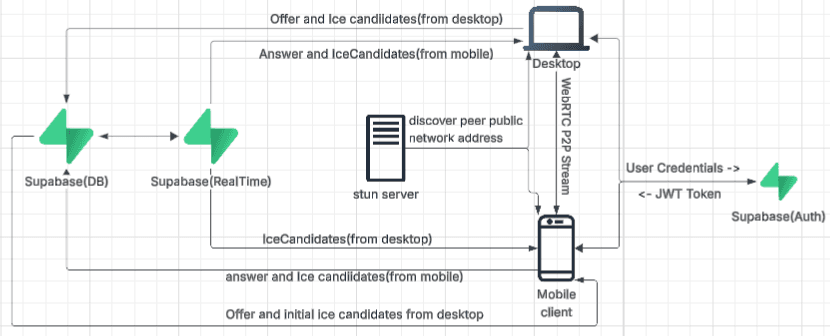
Supabase acts as the signaling layer to exchange WebRTC offers, answers, and ICE candidates. Once connected, all data flows peer-to-peer eliminating latency overhead, server costs, and subscription requirements.
The Electron app captures the screen using the desktopCapturer API and creates a WebRTC connection. The offer is stored in Supabase along with a session code.
The second device retrieves the offer, sends an answer, and both sides exchange ICE candidates through Supabase until a direct peer-to-peer connection is established typically within 3–5 seconds. After that, all streaming happens directly between devices.